One QR Code, Six Ways to Connect
A restaurant owner puts a QR code on every table. Customers scan it expecting a menu - but it opens the owner's website. A week later, they change it to WhatsApp for direct orders. Next month, it's a phone number for reservations. Same QR code. No reprinting. This is the power of the Website URL QR code.
It's our most versatile QR type because it's not just for websites. It handles six different link types - all from one dropdown.
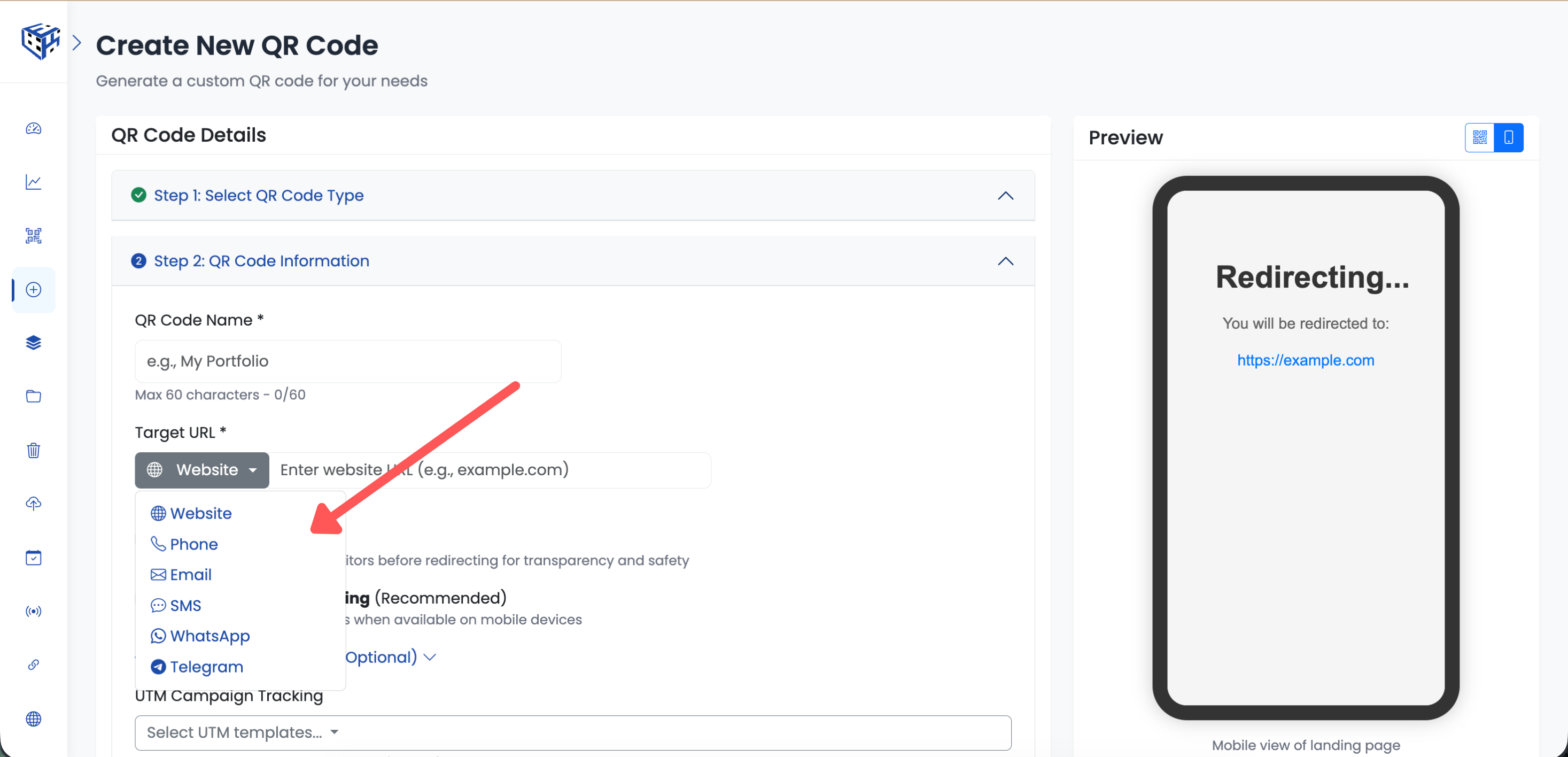
Switch between website, phone, email, SMS, WhatsApp, or Telegram
All Six Link Types
| Link Type | What Happens When Scanned | Best For |
|---|---|---|
| Website | Opens any webpage | Marketing, product pages, portfolios |
| Phone | Opens dialer ready to call | Support hotlines, sales calls |
| Opens email app with address filled | Contact forms, inquiries | |
| SMS | Opens messaging ready to send | Quick feedback, opt-ins |
| Opens WhatsApp chat | Customer support, orders | |
| Telegram | Opens Telegram chat/channel | Communities, announcements |
Website Link Options
When you choose Website, you get the most features. Just paste your URL and optionally enable:
| Option | What It Does |
|---|---|
| Smart App Opening | Opens YouTube, Instagram, Spotify etc. in native apps instead of browser |
| Preview Page | Shows destination URL before redirecting - builds trust |
| Smart Rules | Redirect by device (iOS/Android), country, time of day, or language |
Phone, Email & SMS Options
| Link Type | Required Field | Optional Fields |
|---|---|---|
| Phone | Phone number with country code (+919876543210) | None |
| Email address | Subject, Body (pre-fill the message) | |
| SMS | Phone number with country code | Message (max 140 characters) |
WhatsApp & Telegram Options
| Link Type | Required Field | Optional |
|---|---|---|
| Phone number with country code | Welcome message (max 160 characters) | |
| Telegram | Username (without @) | None - opens t.me/username |
Real Business Examples
| Business | Link Type | How They Use It |
|---|---|---|
| E-commerce store | Website | Product page with Smart App Opening for Instagram links |
| Local plumber | Phone | One scan, customer is calling them |
| Freelancer | Pre-filled subject: 'Project Inquiry from QR' | |
| Restaurant | Pre-filled: 'Hi, I'd like to place an order' | |
| Tech community | Telegram | Join their announcement channel instantly |
Tip
You can switch between link types anytime without changing the QR code. Start with a website, switch to WhatsApp for a campaign, then back to website - same printed QR code works throughout.
Still facing difficulties?
Click here to contact our support team for assistance