The Frustrating Extra Steps
Someone scans your QR code linking to your Instagram profile. Instead of opening Instagram directly, they land in a mobile browser. Now they see "Open in app?" prompts, cookie consent banners, and login screens. Half of them give up before ever seeing your profile.
Smart App Opening eliminates this friction. When someone scans your QR code, it detects if they have the app installed and opens it directly. No browser. No extra taps. Instant app experience.
100+ Apps Auto-Detected
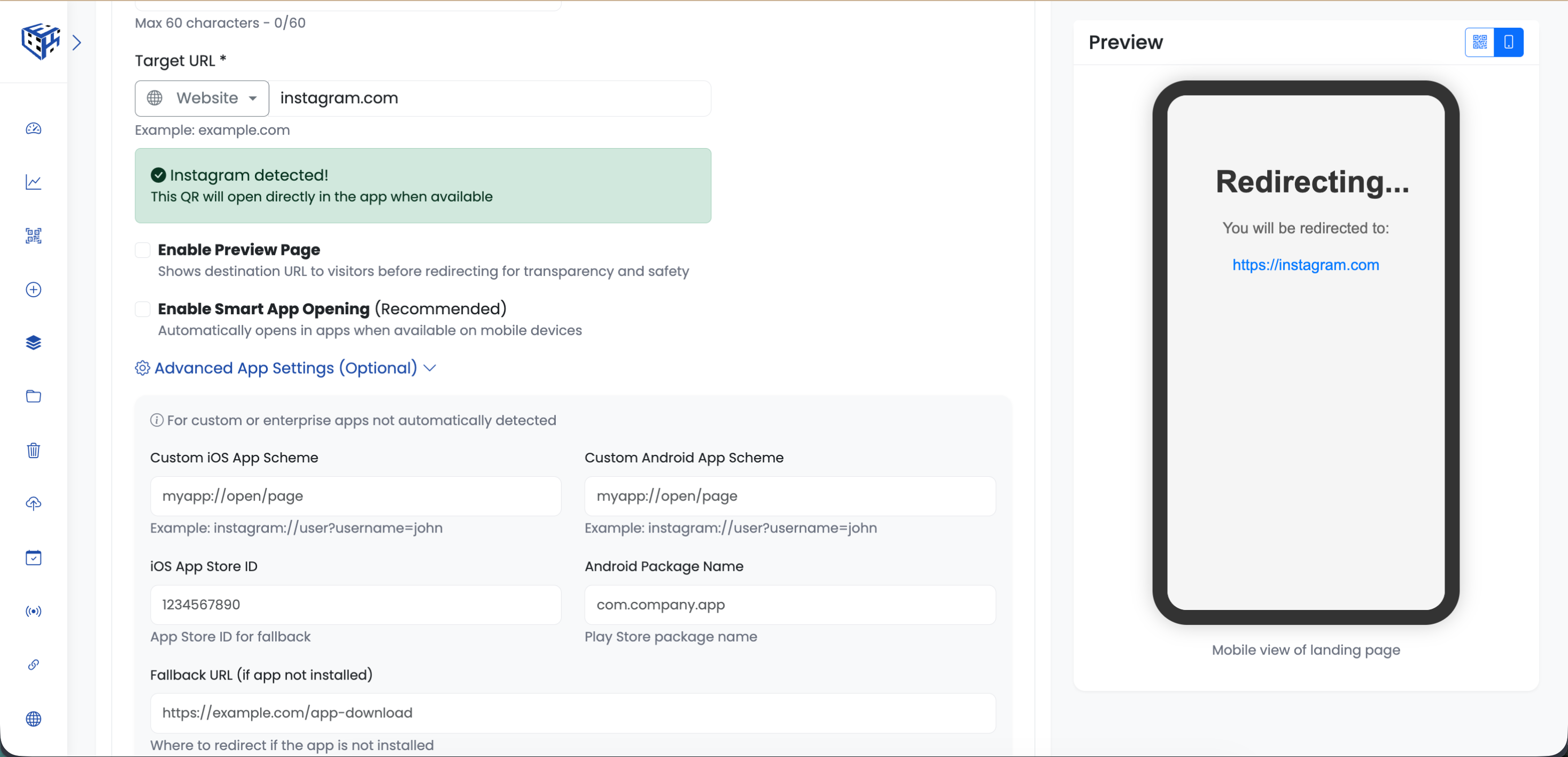
Just paste your URL - ElkQR automatically detects the app and shows you which one will open. No configuration needed.
| Category | Apps Supported |
|---|---|
| Social Media | Instagram, Facebook, Twitter/X, LinkedIn, TikTok, Snapchat, Pinterest, Reddit, Discord |
| Messaging | WhatsApp, Telegram, Signal, WeChat, LINE, Viber, Skype |
| Payments | PayPal, Venmo, Cash App, Google Pay, Paytm, PhonePe, Razorpay |
| Shopping | Amazon, eBay, Flipkart, Myntra, Walmart, Target, Etsy, AliExpress |
| Food Delivery | Uber Eats, DoorDash, Zomato, Swiggy, Deliveroo, Starbucks |
| Transport | Uber, Lyft, Ola, Grab, Google Maps, Waze, Apple Maps |
| Entertainment | YouTube, Spotify, Netflix, Disney+, Prime Video, Twitch, SoundCloud |
| Productivity | Zoom, Microsoft Teams, Slack, Notion, Google Drive, Dropbox |
| Travel | Airbnb, Booking.com, Expedia, TripAdvisor, MakeMyTrip |
How It Works
When you paste a URL like instagram.com/yourprofile, ElkQR instantly shows "App detected!" with the Instagram icon. When someone scans:
- If Instagram is installed → Opens directly in Instagram app
- If not installed → Opens in browser (graceful fallback)
Real Examples
| Your URL | What Opens |
|---|---|
| youtube.com/watch?v=xyz | YouTube app with video ready to play |
| instagram.com/yourpage | Instagram app on your profile |
| spotify.com/track/abc | Spotify app playing the track |
| wa.me/1234567890 | WhatsApp chat with that number |
| zoom.us/j/123456 | Zoom app joining the meeting |
| maps.google.com/?q=address | Google Maps with directions |
Custom Apps (Advanced)
Have a custom or enterprise app not in our list? Click "Advanced App Settings" to manually configure iOS/Android app schemes, App Store IDs, and fallback URLs.
Tip
Smart App Opening is enabled by default and works only with Website URL QR codes. You'll find the toggle right below the URL field.
Still facing difficulties?
Click here to contact our support team for assistance